If you're a content creator on Telegram looking to monetize your content and engage with your audience more effectively, Graphy's Telegram Subscription Management is all you need. Telegram, with its vast user base and secure messaging platform, is a popular choice for content creators to connect with their audience. With Graphy's Telegram Subscription Management feature, content creators can effortlessly manage subscriptions and payments while focusing on what they do best—creating content.
Whether you're a blogger, podcaster, educator, or any other type of content creator, Graphy's Telegram Subscription Management can be a valuable addition to your monetization toolkit. Here's how it works and what it means for creators:
Automated Subscription Management
Graphy's Telegram Subscription Management feature automates the entire subscription process. Creators can set up different tiers of subscriptions with exclusive content and perks for their subscribers. With just a few clicks, subscribers can join their preferred tier, and payments are processed seamlessly. This automation saves creators time and effort, allowing them to focus on creating and engaging with their audience.
Flexible Subscription Tiers
Creators can set up various subscription tiers, each with its own unique benefits. They can seamlessly transition from one-time payments to subscription models, providing their audience with monthly, quarterly, semi-annual, and annual payment options. This versatility allows creators to cater to a wider audience and ensures that everyone can enjoy their premium content.
Be it early access to content, exclusive behind-the-scenes access, personalized messages, or any other perks, creators can tailor their offerings to cater to their audience's interests and preferences. This flexibility ensures that subscribers get the value they expect.
Content Monetization
Graphy's Telegram Subscription Management feature enables creators to monetize their content effortlessly. With subscribers paying a recurring fee, creators can have a more predictable income stream, making it easier to plan their content creation and maintain consistency.
Audience Engagement
Engaging with your subscribers is key to building a loyal and supportive community. Graphy's subscription management on Telegram sends automated payment reminders and even allows creators to send personalized messages and updates to their subscribers. Creators can keep their audience informed about upcoming content, events, or any other relevant information.
Secure Payment Processing
Security is a top priority when handling payments, and Graphy ensures that the payment process is secure and hassle-free. Subscribers can make payments using various payment methods, and creators can easily track and manage their earnings through the platform.
Getting Started with Telegram Subscription Management
Step 1: Login to Graphy as a Creator
To get started with Telegram Subscription Management, log in to your Graphy account as a creator. This will be your hub for managing your subscriptions seamlessly.
Step 2: Go to Products > Telegram
Navigate to the left navigation panel in your Graphy dashboard and select "Products" > "Telegram". This is where you'll set up and manage your monetized Telegram communities.
Step 3: Click on 'Connect Your Telegram'

Click on the "Connect your Telegram" button to begin the process of creating and managing your Telegram community.
Step 4: Link Your Telegram Account with Graphy
A popup window titled "Link Telegram account with Graphy" will appear with two options to connect.
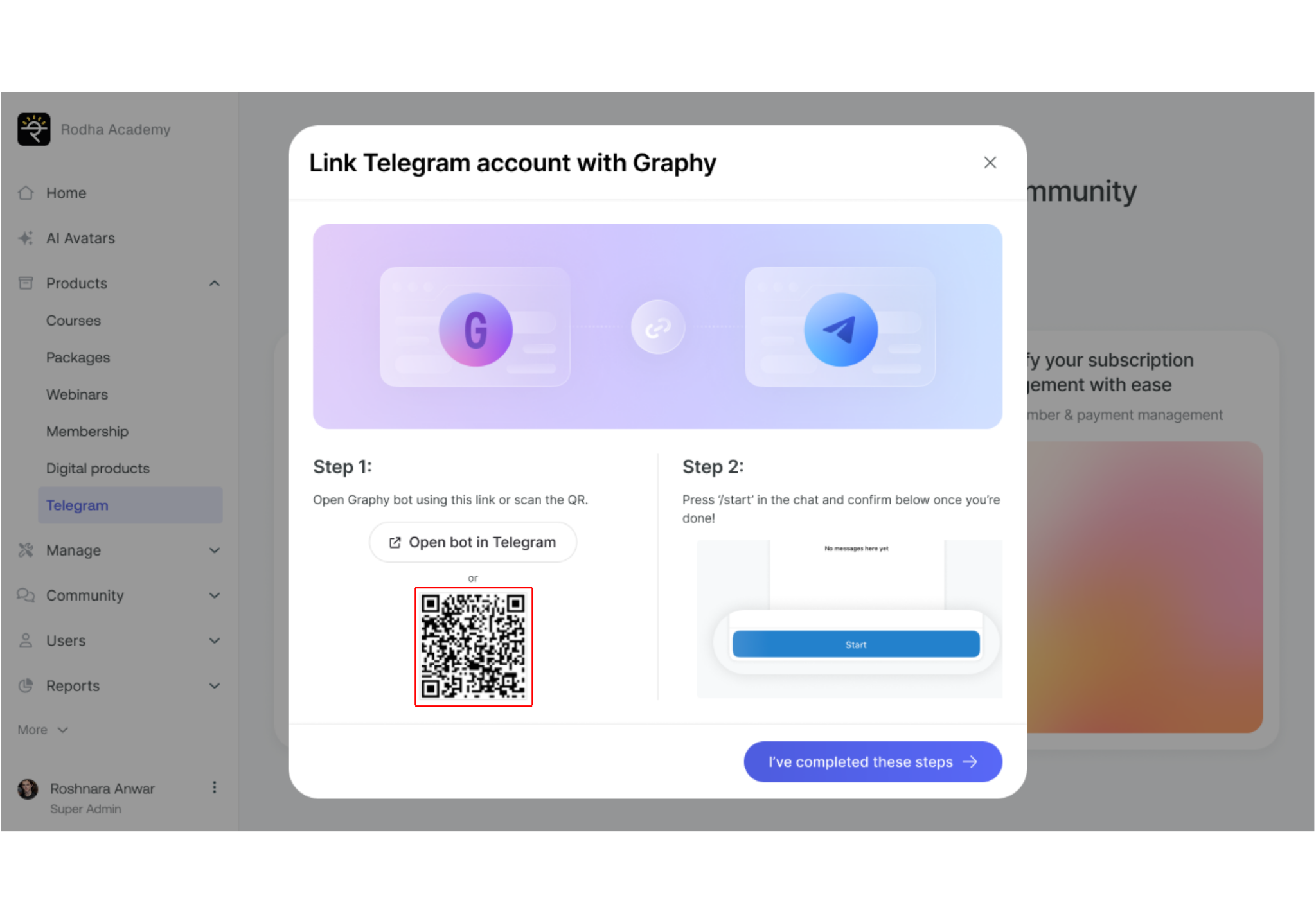
Follow the mentioned steps to connect your Telegram account with Graphy. You can add the Graphy bot to as many groups or channels you want in one go.
Step 1: Open Graphy bot using this link or scan the QR. Click "Open bot in Telegram" or scan the QR code displayed on the screen.
Step 2: Press '/start' in the chat and confirm below once you're done!
When you open the Graphy bot in Telegram, you will see a welcome message:
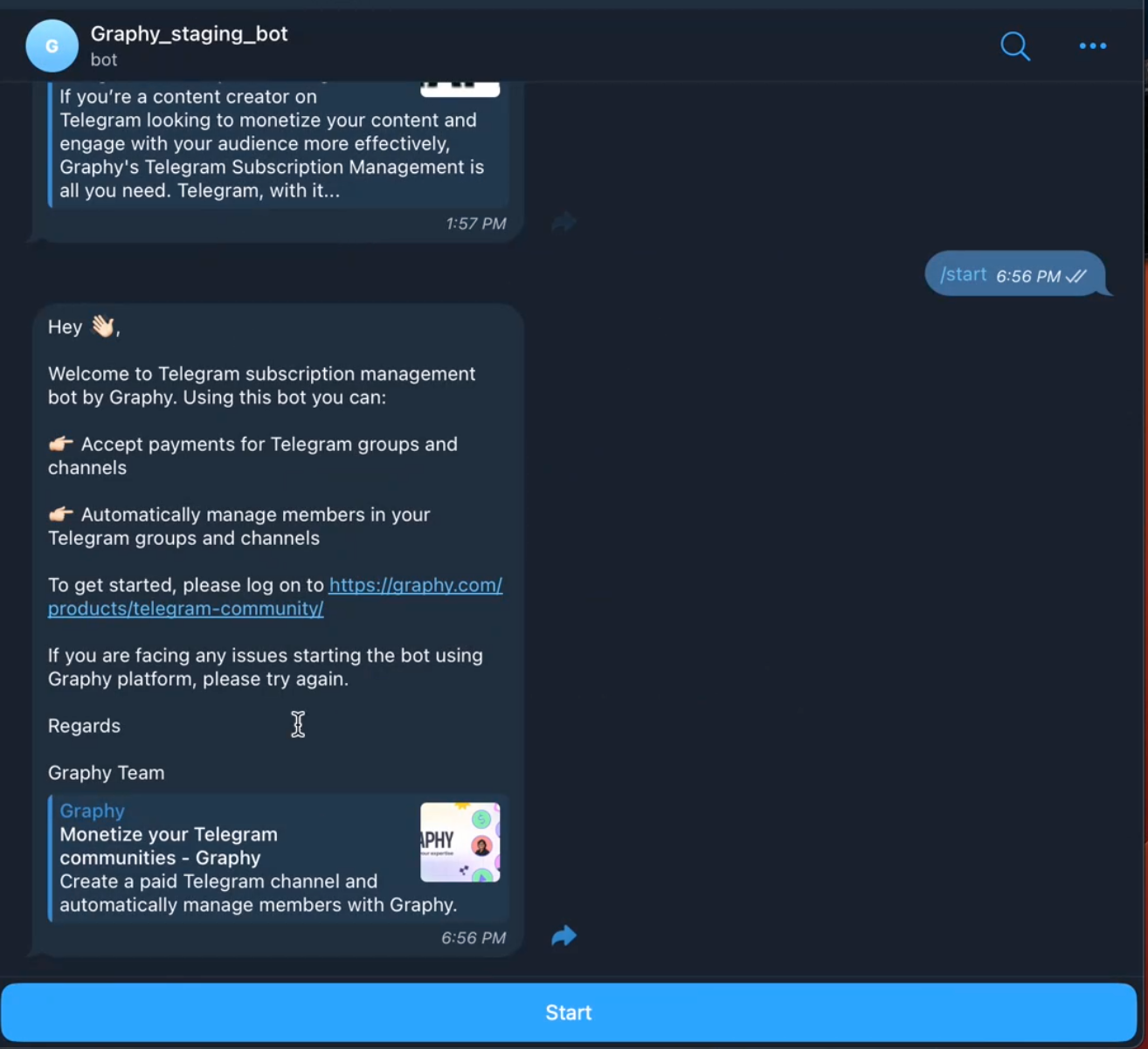
The bot will greet you with: "Hey ?, Welcome to Telegram subscription management bot by Graphy. Using this bot you can:
? Accept payments for Telegram groups and channels
? Automatically manage members in your Telegram groups and channels
To get started, please log on to https://graphy.com/products/telegram-community/"
Type '/start' in the chat to initiate the connection. Then click "I've completed these steps" in the Graphy platform to proceed.
Once done, click on "I've completed these steps" to move forward.
Step 5: Click on 'Start Selling Telegram'
Now that your Telegram account is successfully linked, you will see a confirmation message.
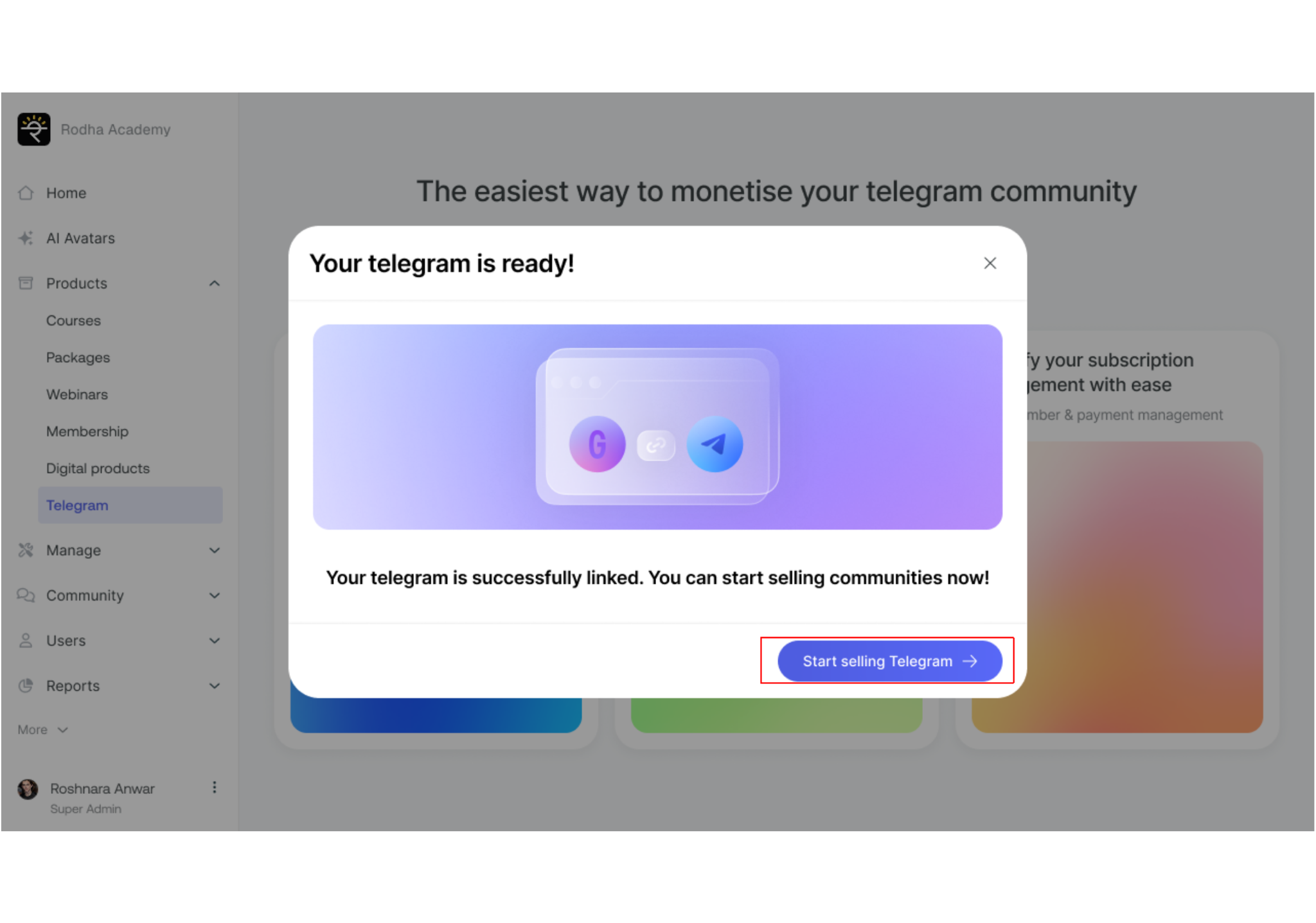
Your telegram is successfully linked. You can start selling communities now! Click on the "Start selling Telegram" button to proceed.
Step 6: Add Graphy Bot to Your Telegram communities
Please note that one Telegram community can have multiple groups or channels. To add those channels or groups to your Telegram community, you first need to add @graphy_bot to that particular channel/group as an admin with the right to add or remove users.
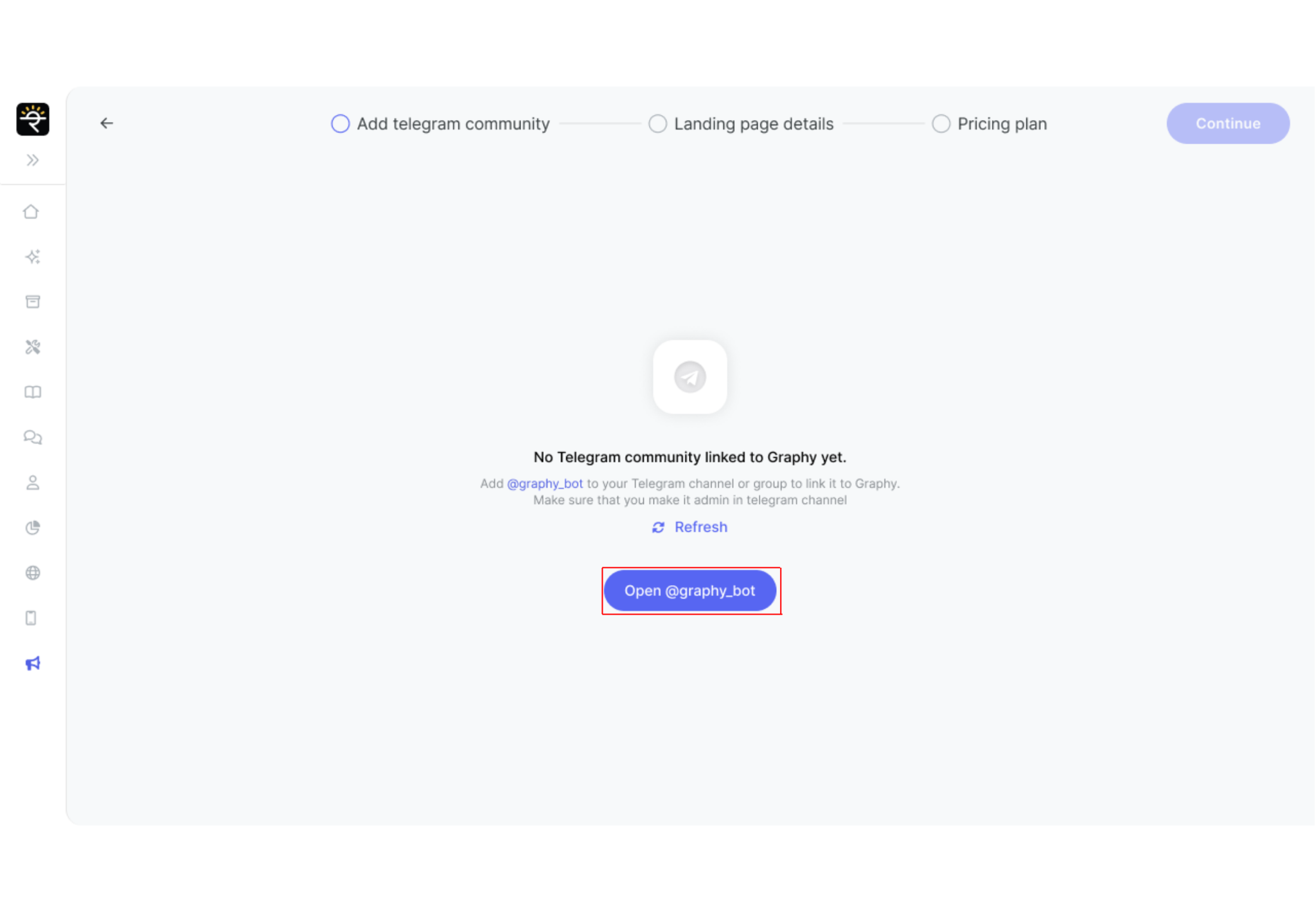
Add @graphy_bot to your Telegram channel or group to link it to Graphy. Make sure that you make it admin in the telegram channel.
After adding @graphy_bot, click on the "Refresh" button or "Open @graphy_bot" to proceed.
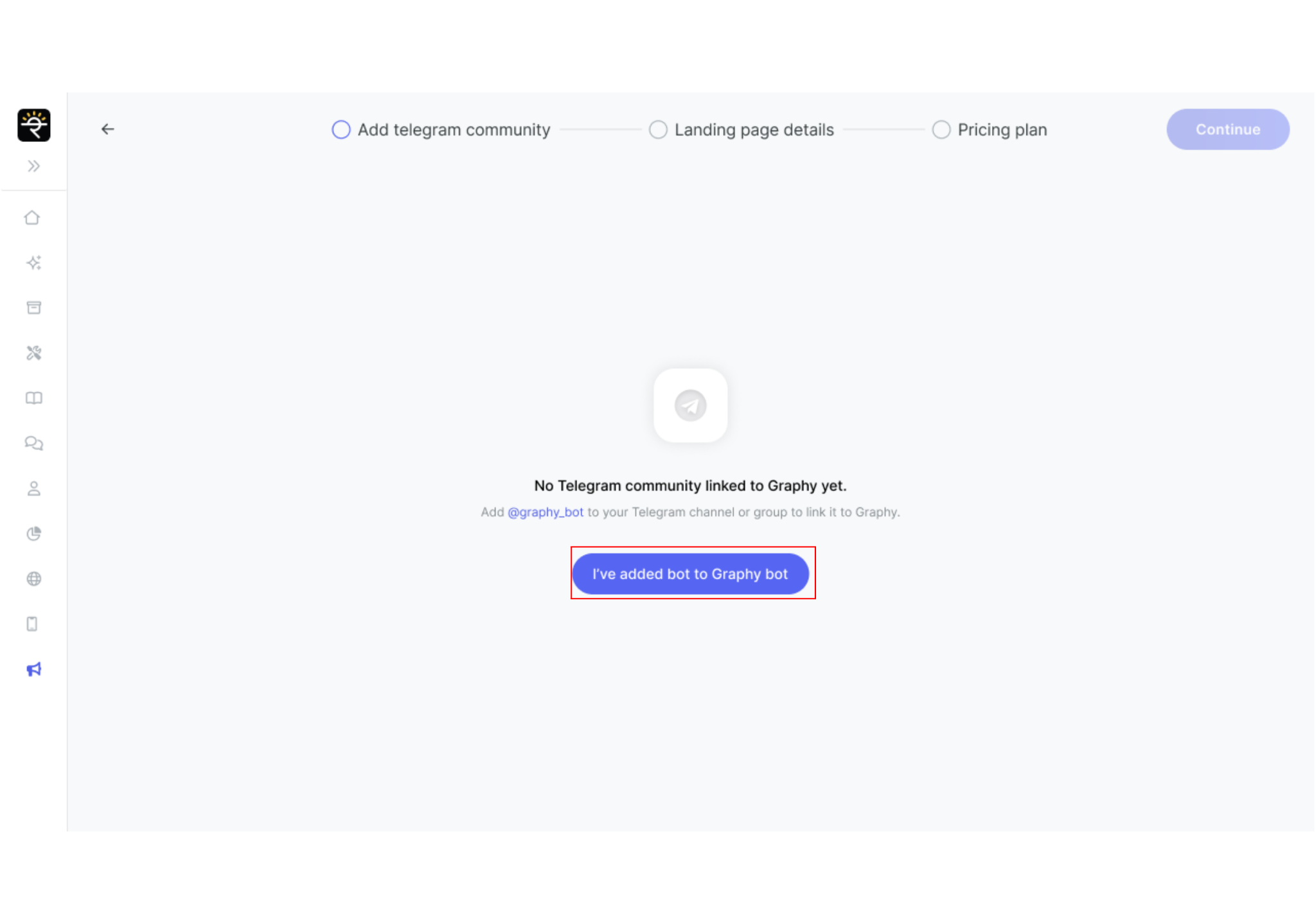
Once you have added @graphy_bot as an administrator in your Telegram groups or channels, click "I've added bot to Graphy bot" to continue.
Step 7: Pick communities you want to sell

Now simply select the communities from the list that you want to sell. The screen shows "Telegram communities are synced" at the top, indicating successful connection.
Please note that you can add up to 5 communities. Want to link a new community to graphy? Add @graphy_bot as an admin in it and refresh the list here. Want to add a new community, click on "Connect now".

Click the "+ Add" button on each community you want to sell. Selected communities will appear in the "Selected" panel on the right side. Once you've selected the communities, you'll see a tooltip message: "You can add max 5 communities." Click "Continue" to proceed to the landing page setup.
Step 8: Add Landing Page details
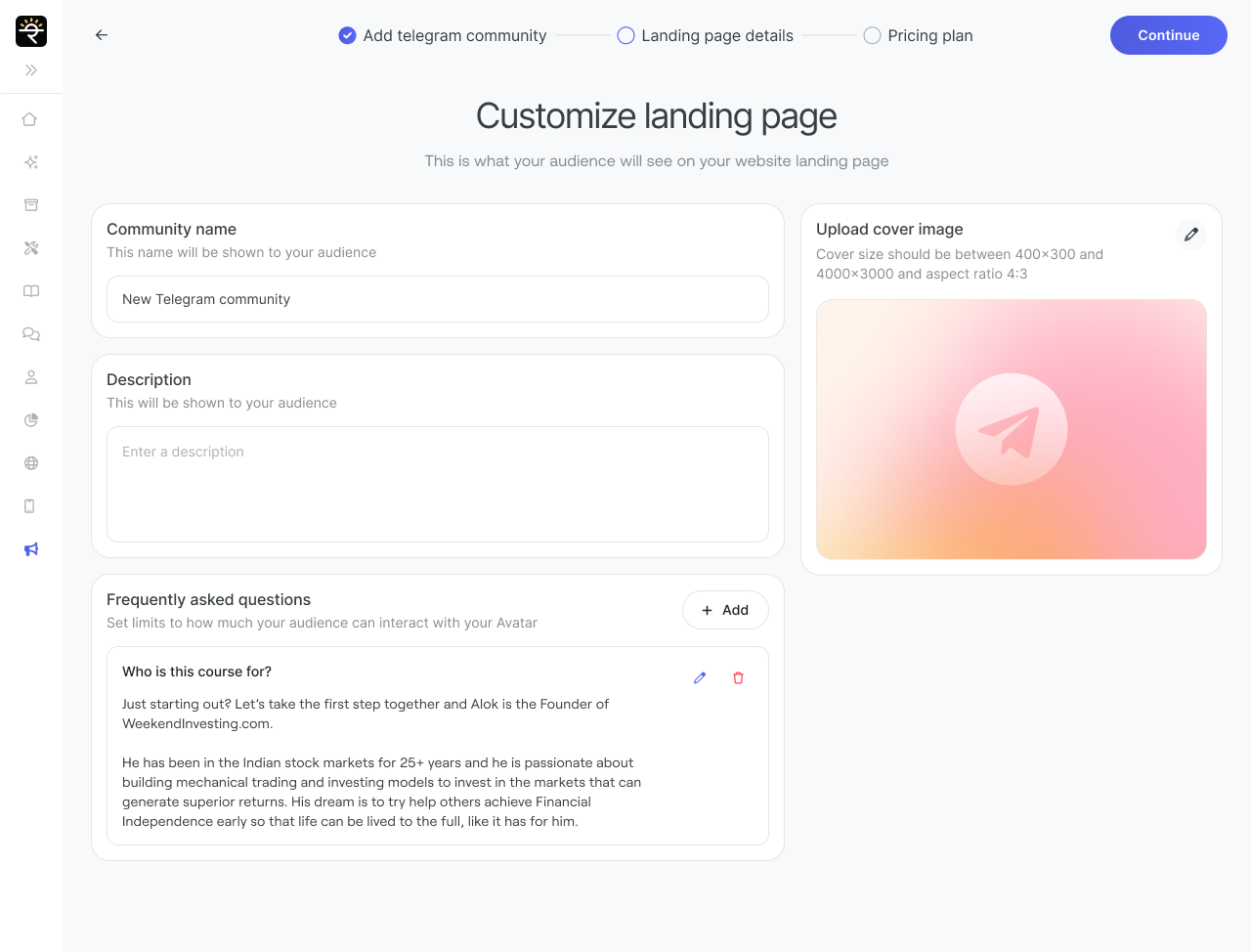
Enter the essential details, including Community name, description, upload a cover image, and add an FAQ section.
Community name: This name will be shown to your audience. Enter a catchy and relevant title for your community.
Description: This will be shown to your audience. Provide a detailed description of what your community offers and what members will learn or gain.
Upload cover image: Click the upload icon to select a cover image that represents your community. This image will be shown to your audience.
Frequently asked questions: Set limits to how much your audience can interact with your Avatar. Click "+ Add" to enter new questions and answers that help potential subscribers understand your community better.
Please note that the name and description set here will also be used in the Telegram Channel.
After filling out these details, simply click on "Continue" to move to the pricing setup.
Select Your Subscription Plan
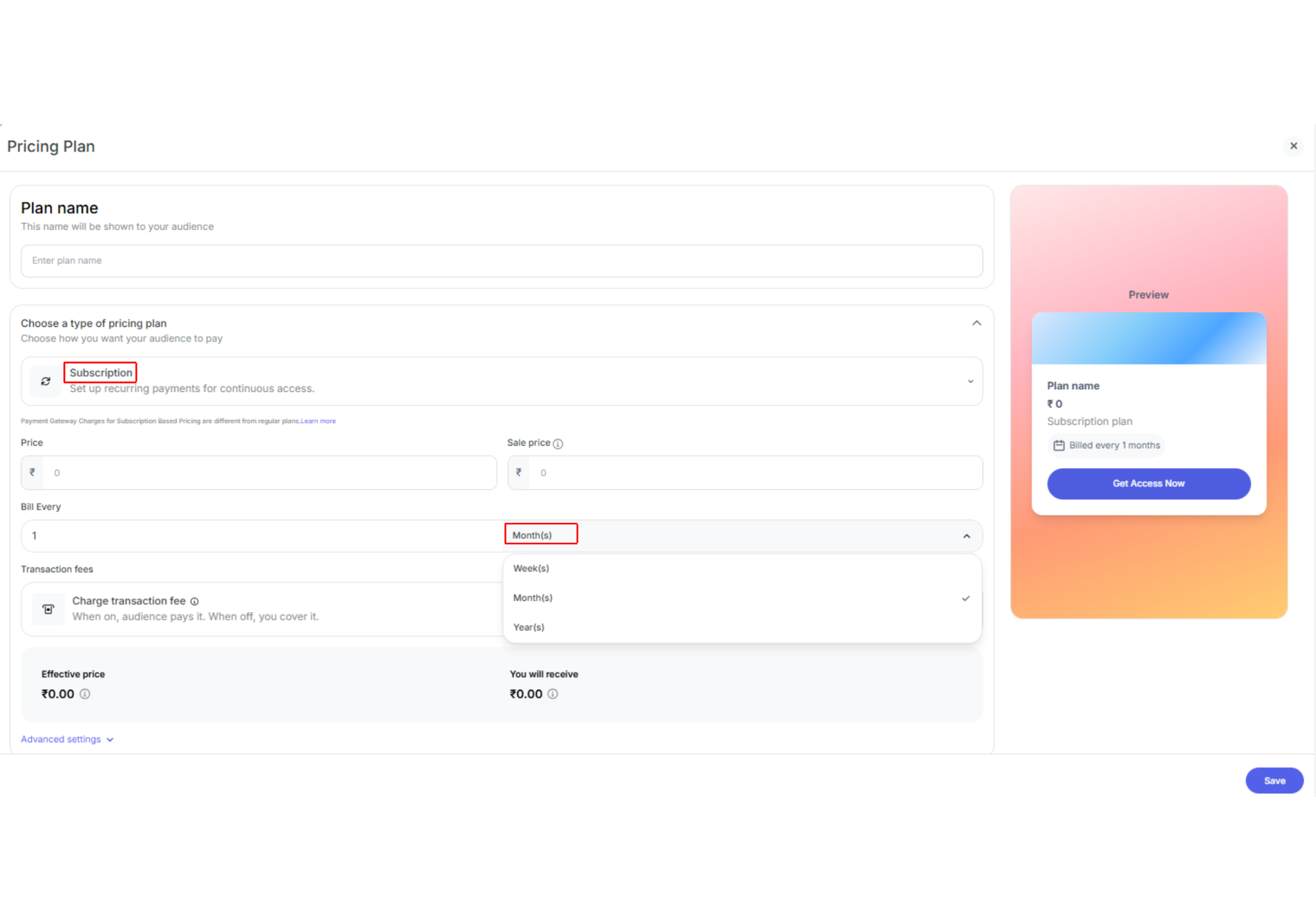
When setting your pricing, this is where you set up recurring revenue through subscriptions!
Understanding Recurring Revenue
Recurring revenue means setting up subscription-based payments where your subscribers are automatically charged at regular intervals (monthly, quarterly, annually, etc.). This provides you with predictable, steady income instead of one-time payments.
Plan name: This name will be shown to your audience. Enter a descriptive name like "Monthly Access" or "Premium Membership".
Subscription: Set up recurring payments for continuous access - This is how you drive recurring revenue!
Select "Subscription" to set up recurring billing for your community. This flexibility ensures that your subscribers have options that fit their preferences and your content release schedule.
Setting Up Your Subscription Plan
Once you select "Subscription", you'll see detailed pricing options:
Price: Enter the regular price your subscribers will pay (e.g., ₹0 to start).
Sale price: Enter a discounted price if you want to offer an introductory rate.
Bill Every: This is where you set your recurring billing cycle. Enter a number and select the billing frequency:
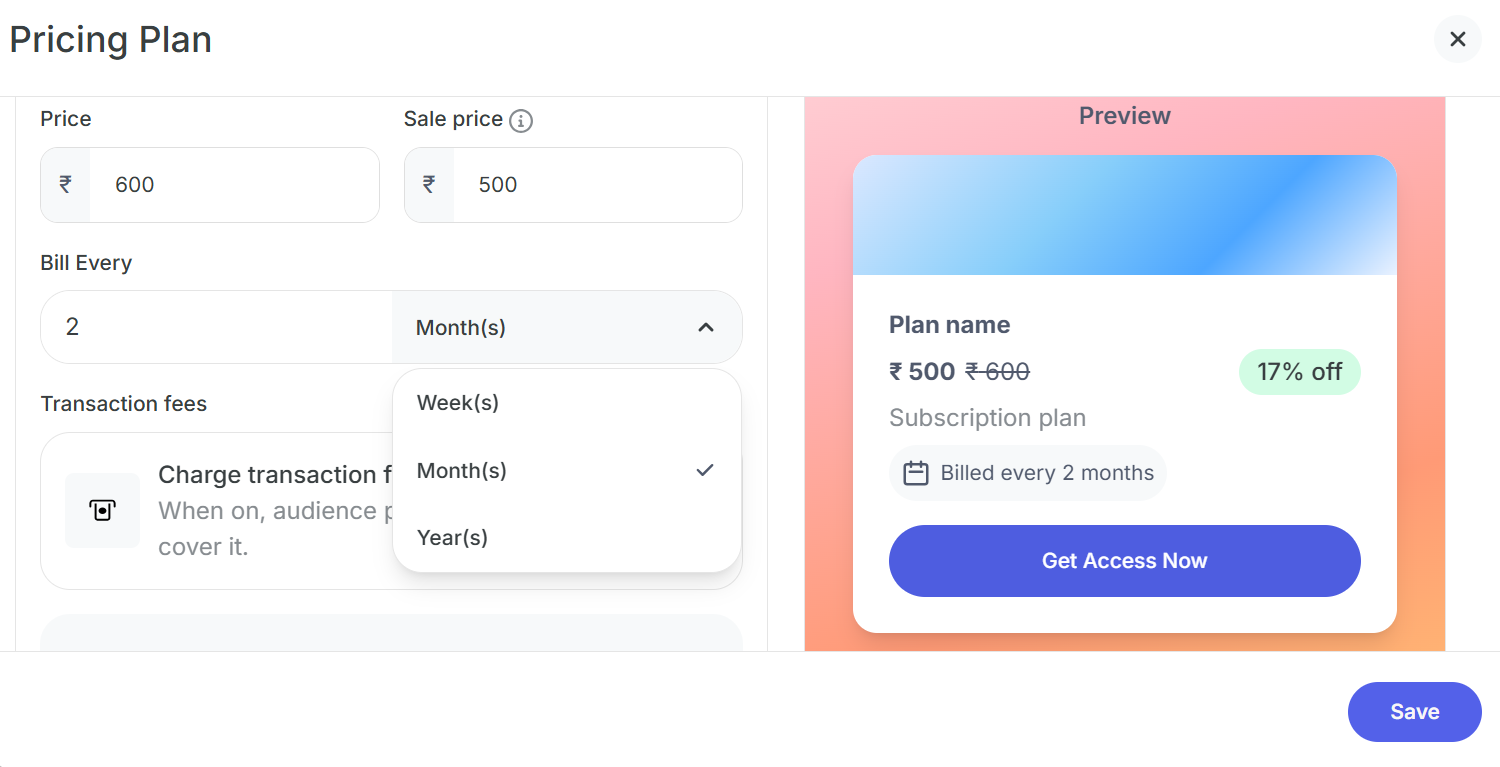
Available billing frequencies:
Week(s): Bill subscribers every week or multiple weeks (e.g., every 2 weeks)
Month(s): Bill subscribers every month or multiple months (e.g., every 3 months for quarterly billing)
Year(s): Bill subscribers annually or multiple years
Example: Setting "1" and "Month(s)" means subscribers will be billed ₹X every 1 month - this creates monthly recurring revenue.
Transaction fees: Toggle "Charge transaction fee" to decide who pays the payment gateway charges:
When on (toggle enabled): Audience pays it. "When on, the audience pays for it. When you're off, you cover it."
When off (toggle disabled): You cover the transaction fees
Payment Gateway Charges: Payment Gateway Charges for Subscription Based Pricing are different from regular plans. Learn more about the fee structure.
Advanced settings: Click "Advanced settings" to access additional options like customize button text, renewal settings with auto-pay options, and more.
Click "Save" at the bottom right to save your pricing plan, or click "Publish" to make your community live.
Step 9: Publish
Once you have set up all the necessary parameters for your Telegram community, click on "Publish."
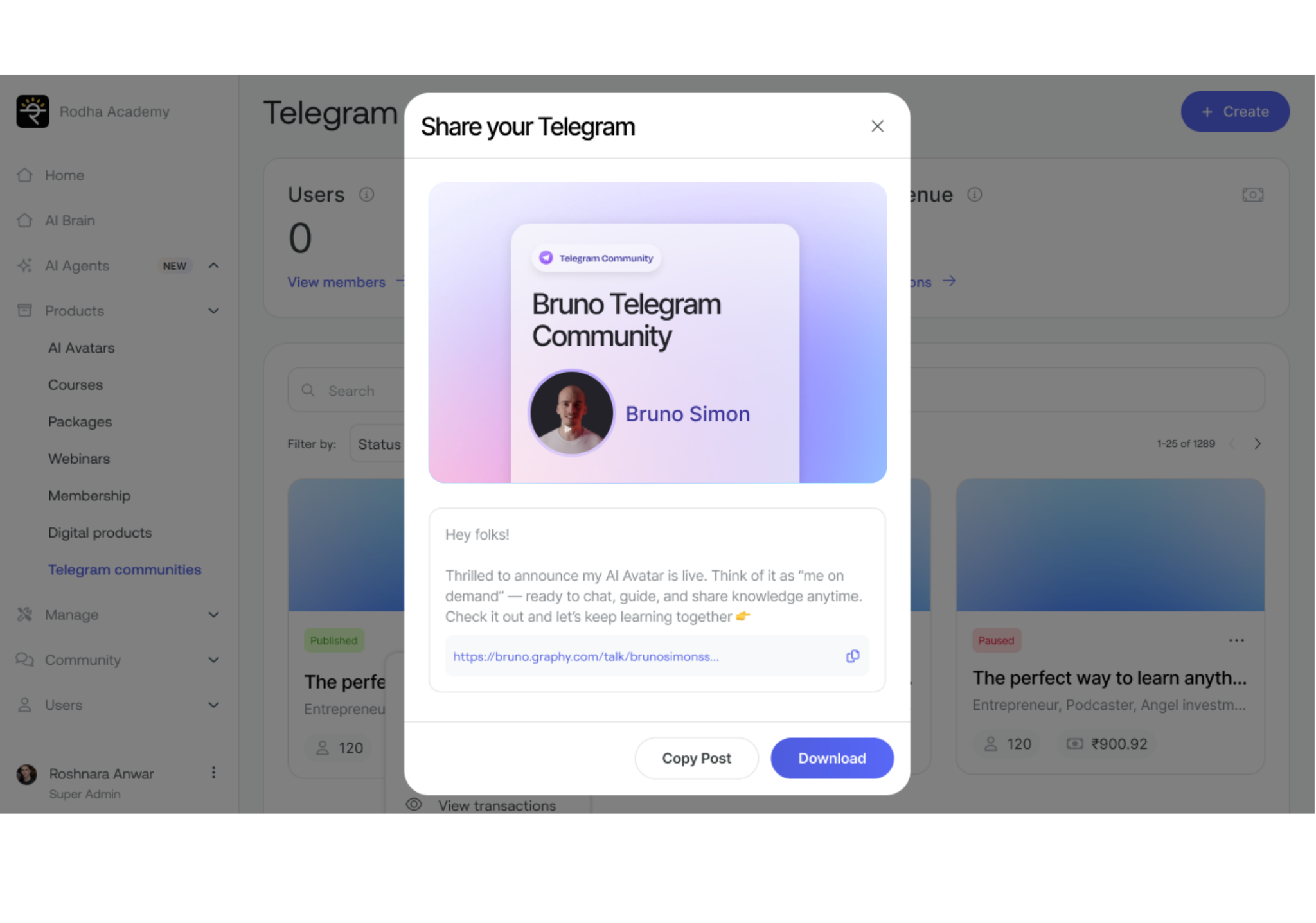
After publishing, a "Share your Telegram" popup will appear, allowing you to promote your community. The share screen displays your community preview card with your name and branding, a pre-written promotional message, your unique community link, "Copy Post" button, and "Download" button.
Copy the link to see your landing page. Your audience will also get a one-time joining link to join your channel. With Graphy's subscription management system in place, you can now focus on creating, engaging with your community, and, most importantly, earning revenue through your premium content.
Are you ready to take your content monetization to the next level? Explore Graphy's Telegram Subscription Management feature and start earning effortlessly.
Was this article helpful?
Start monetizing your Telegram community with recurring subscriptions today and build a sustainable content business!
Was this article helpful?
That’s Great!
Thank you for your feedback
Sorry! We couldn't be helpful
Thank you for your feedback
Feedback sent
We appreciate your effort and will try to fix the article